
How to Turn a Selfie Into a Halloween Costume
A step-by-step guide to turning a selfie into a Halloween costume portrait with AI: source photo, costume prompt, identity preservation, and model choice.
On this page
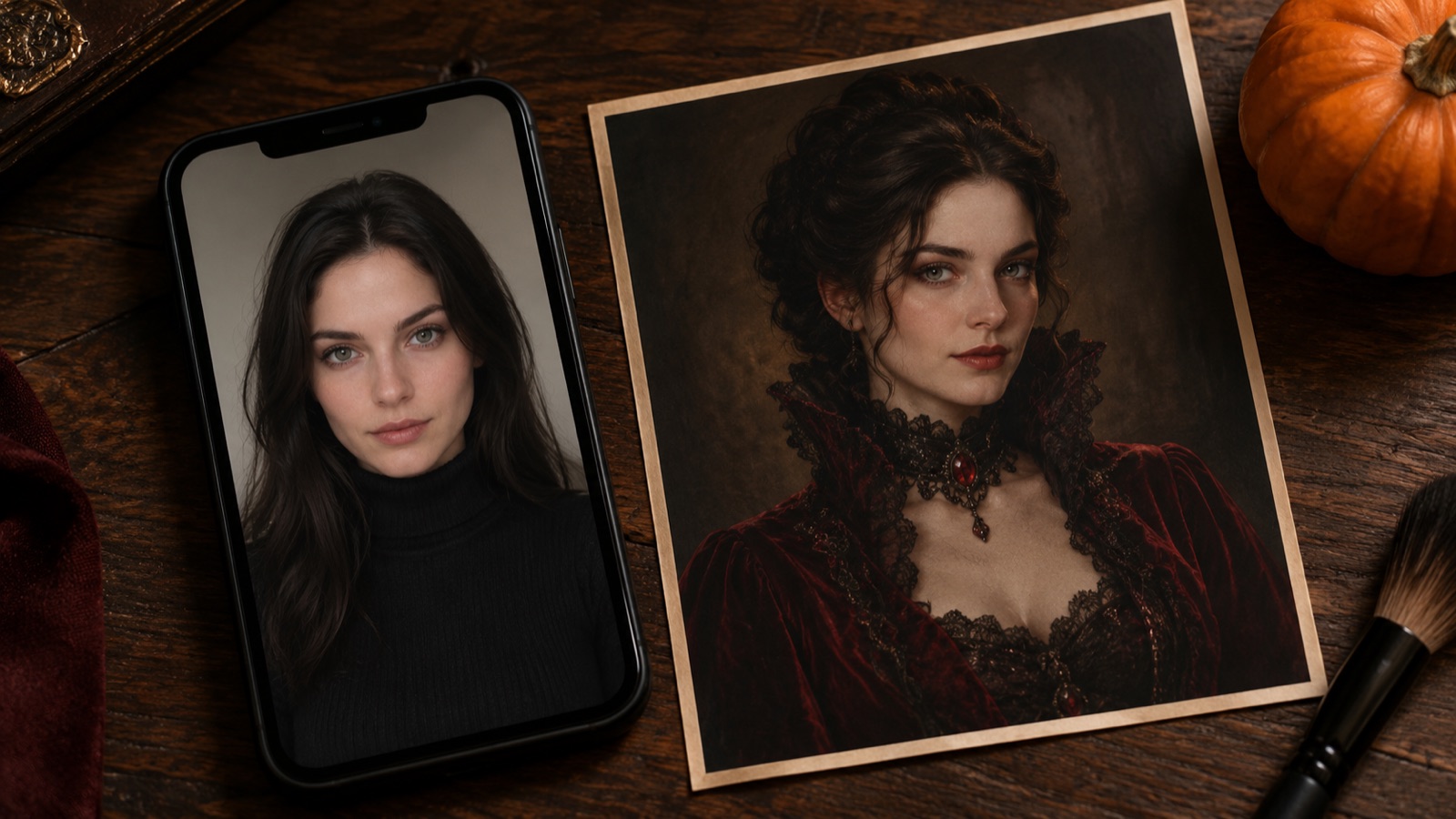
Short answer: upload one clear, front-facing selfie to an image-editing model, choose a costume prompt that says what to preserve and what to change, and generate at 1K until the composition works. Then raise the resolution. The face is the hard part: put identity preservation in the first sentence, keep the lighting direction explicit, and change one thing at a time.
Most people try this backwards. They start with a costume idea, generate a stranger wearing it, and then wonder why the result does not look like them. The model did exactly what it was asked: it invented a person and a costume. If you want a portrait of yourself in a costume, the photo has to be the primary reference, and the prompt has to protect it.
This guide walks through the workflow we use on the AI Halloween costume generator, including the parts that fail and the fixes that actually work.
What the workflow changes
An image-to-image edit receives two inputs: your photo and a text instruction. The instruction is not a caption. It is a list of constraints. A useful costume prompt has four parts:
- Preserve: identity, facial proportions, skin tone, approximate age, body proportions, pose.
- Change: the costume, hair, makeup, and accessories, described with concrete nouns.
- Place: the location, depth layers, and background.
- Avoid: changed identity, extra limbs, duplicated fingers, text, logos, watermarks.
The order matters. If the costume comes first, the model tends to rebuild the person to fit the outfit. If preservation comes first, the person stays put and the outfit adapts. This is not a guarantee, but it is the single biggest lever you control.
The source photo checklist
The model can only preserve what it can see. A dark, angled, filtered selfie gives it less information than a boring daylight portrait. Before you write a prompt, check the source:
- The face is sharp and unobstructed. No sunglasses, no hand, no hair covering one eye.
- The light is even. A window in front of you is better than a ceiling light above you.
- The camera is at eye level. A low angle changes the jaw and the nose before the model does anything.
- The background is simple. A plain wall is easier to replace than a bookshelf.
- The torso is visible if you want a full costume. A tight face crop leaves nowhere for a collar or a cape.
- You have permission to use the photo. If it is someone else, ask before you upload or share.
A phone photo is fine. A professional portrait is not required. What matters is that the face is readable and the light is consistent.
Writing the prompt
Here is the structure we use for the Midnight Braids preset, one of the six looks on the generator page:
Use the uploaded photo as the primary reference. Preserve the subject's recognizable facial identity, facial proportions, skin tone, approximate age, and natural anatomy. Transform the subject into an original gothic Halloween fashion portrait. Change the hairstyle into long violet braids decorated with delicate silver hair accessories. Replace the clothing with an elegant black-and-purple velvet outfit with subtle lace and metallic details. Place the subject in a moonlit Victorian garden with soft fog, glowing lanterns, and dark autumn foliage. Use photorealistic editorial photography, realistic fabric texture, natural skin detail, and cinematic soft lighting. Keep the same number of people as the uploaded photo. Avoid altered facial identity, extra limbs, duplicated fingers, distorted anatomy, text, logos, and watermarks.
Notice what is not there: the word "spooky", the phrase "8K", and a list of five moods. Those words do not tell the model what to draw. Concrete nouns do: violet braids, velvet, lace, fog, lanterns, autumn foliage.
If you want to customize the look, change one sentence at a time. Swap violet for copper, or the garden for a stone hallway. Keep the preservation sentence and the avoidance sentence intact. That gives you a controlled comparison instead of a new lottery ticket.
Six directions that work as portraits
The best costume for an AI portrait is legible from the shoulders up. A full mascot head hides the person; a subtle accessory keeps the face visible and gives the model a stable reference. These six directions cover the range:
| Direction | What changes | Best source photo |
|---|---|---|
| Gothic braids | Hair, velvet outfit, moonlit garden | Head-and-shoulders portrait |
| Celestial princess | Gown, crown, observatory | Three-quarter or full body |
| Wearable robot | Armor panels, studio light | Front-facing with shoulders |
| Forest witch | Layered cloak, practical makeup | Neutral indoor portrait |
| Skeleton makeup | Makeup only, plain studio | Sharp close-up |
| Original hero | Fitted suit, gradient studio | Front-facing, neutral pose |
If you want a couple or a pet, use the couple costume generator or the pet costume generator. Those workflows need different prompts because they have to protect two identities or an animal's anatomy.
Model and resolution choices
The model picker inside the workspace is the source of truth for what is available. Different models handle identity, fabric, and instruction-following differently, and the credit cost changes with the model and resolution.
A practical sequence:
- Generate at 1K with a lower-cost model. You are testing the composition, not the final quality.
- Pick the version where the face, the costume silhouette, and the background all work.
- Rerun that prompt at a higher resolution or on a stronger model.
- Stop when the result is good enough for the use case. A profile photo does not need a 4K render.
Do not choose a model because a review called it the best. Choose it by comparing two outputs of your own photo. The face you are trying to preserve is the variable that matters, and it is different for every source image.
What goes wrong, and the fix
The face changes. Strengthen the preservation sentence, reduce the amount of costume change, and avoid prompts that ask for a different age or a different ethnicity. If the source is blurry, fix the source first.
Extra fingers or hands. Crop the hands out of the source, ask for a waist-up portrait, or add "natural hands, five fingers" to the avoidance list. Hands are the most common structural failure.
The costume looks like plastic. Ask for realistic fabric texture and natural wear. Avoid "hyperreal" and "8K"; those words push the model toward a glossy render.
The background ignores the subject. Name the light direction on the subject and the background separately. "Warm rim light from the left, dark garden behind" is easier to follow than "cinematic Halloween scene".
A third person appears. Add "keep the same number of people as the uploaded photo" and check that the source does not contain another face in the background.
Privacy, credits, and honest limits
Uploaded images are sent to the image provider so it can process the edit. Do not upload identity documents, images of children, or photos you do not have the right to use. The omogle privacy policy covers what the site stores; the provider processes the image under its own terms.
Generation uses credits from your omogle account. The workspace shows the cost before you submit, and the pricing page lists the current packs. There is no unlimited free generation. If a task fails, read the status before you retry so you do not spend twice on the same error.
A generated costume is a preview, not a guarantee of how a physical costume will fit. Use it to choose a direction, then buy from a seller whose size chart and return policy you have actually read.
Frequently asked questions
Will the generator keep my face recognizable?
The prompts instruct the model to preserve your face, skin tone, and proportions, but identity preservation is not guaranteed. Clear, evenly lit source photos work better. If the face drifts, strengthen the preservation sentence and change less of the scene at once.
Can I use the result as my real Halloween costume?
Treat the output as a visual preview. It can help you choose colors, silhouettes, hair, and makeup, but it does not prove that a physical costume will fit or match the render. Check a real seller size chart before buying.
Does it copy official movie or game characters?
No. The presets are original looks. They may be inspired by a trend or a genre, but they are not official replicas and are not intended to reproduce a licensed character design. You are responsible for how you use and share the output.
What happens to the photo I upload?
It is sent to the image provider to process the edit. Do not upload images you do not have permission to use. The privacy policy covers what omogle stores, and the provider processes the image under its own terms.
Can I generate a couple or a pet costume here?
Use the couple and pet pages for those workflows. A couple photo needs a model that supports multiple reference images, and a pet photo needs a prompt that protects the animal breed, fur, and anatomy.
Try the workflow
The generator at the bottom of the AI Halloween costume generator page has the six presets and the editable prompt. Start with a photo you already like, test one direction at 1K, and only raise the resolution when the composition is right. If you want the prompt library instead, open the Halloween AI prompts page.
Further reading
- Halloween costume — the history and visual vocabulary behind the looks.
- Image generation guide — how prompts and reference images are handled by an image model.
Related guides
Best Halloween AI Prompts for 2026
12 Halloween AI prompt formulas for portraits, couples, pets, backgrounds, and short videos, with the exact preserve-change-light-avoid structure that works.
ReadBuddy the Unicorn Costume Trend, Explained
Why the haunted unicorn mascot became a 2026 Halloween trend, how to build an original look, and how to avoid copying a licensed character or costume design.
ReadHalloween Couple Costume Ideas You Can Preview
Eight coordinated couple costume ideas, the contrast rule that makes them read in a photo, and a multi-reference AI workflow for previewing both looks together.
Read